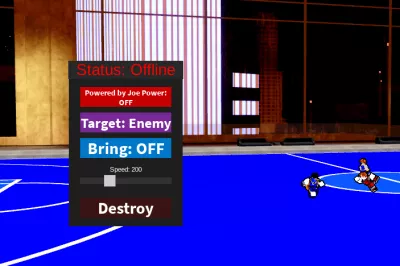
Basketball Zero auto score full court bring ball (UNDETECTED)
4,290 views
Script made by joe and it includes the bring ball and many such features which you can use. also its a keyless script


local PlayerService = game:GetService("Players")
local RunService = game:GetService("RunService")
local UserInputService = game:GetService("UserInputService")

local player = PlayerService.LocalPlayer
if not player then player = PlayerService.PlayerAdded:Wait() end
player:WaitForChild("PlayerGui")

local screenGui = Instance.new("ScreenGui")
screenGui.Parent = player.PlayerGui
screenGui.ResetOnSpawn = false
screenGui.Name = "DunkSystem_V2_REALVERISONJOE"

local frame = Instance.new("Frame")
frame.Parent = screenGui
frame.BackgroundColor3 = Color3.fromRGB(30, 30, 30)
frame.BorderSizePixel = 0
frame.Size = UDim2.new(0, 200, 0, 260)
frame.Position = UDim2.new(0.3, 0, 0.5, -130)
frame.Active = true

local function makeDraggable(guiObject)
	local dragging, dragInput, dragStart, startPos
	guiObject.InputBegan:Connect(function(input)
		if input.UserInputType == Enum.UserInputType.MouseButton1 or input.UserInputType == Enum.UserInputType.Touch then
			dragging = true
			dragStart = input.Position
			startPos = guiObject.Position
			input.Changed:Connect(function()
				if input.UserInputState == Enum.UserInputState.End then
					dragging = false
				end
			end)
		end
	end)
	guiObject.InputChanged:Connect(function(input)
		if input.UserInputType == Enum.UserInputType.MouseMovement or input.UserInputType == Enum.UserInputType.Touch then
			dragInput = input
		end
	end)
	UserInputService.InputChanged:Connect(function(input)
		if dragging and input == dragInput then
			local delta = input.Position - dragStart
			guiObject.Position = UDim2.new(startPos.X.Scale, startPos.X.Offset + delta.X, startPos.Y.Scale, startPos.Y.Offset + delta.Y)
		end
	end)
end
makeDraggable(frame)

local function createSafeButton(parent, pos, size, text, color)
	local container = Instance.new("Frame", parent)
	container.Position = pos
	container.Size = size
	container.BackgroundColor3 = color
	container.BorderSizePixel = 0
	local label = Instance.new("TextLabel", container)
	label.Size = UDim2.new(1, 0, 1, 0)
	label.BackgroundTransparency = 1
	label.Text = text
	label.TextColor3 = Color3.new(1, 1, 1)
	label.TextScaled = true
	label.Font = Enum.Font.SourceSansBold
	local btn = Instance.new("TextButton", container)
	btn.Size = UDim2.new(1, 0, 1, 0)
	btn.BackgroundTransparency = 1
	btn.Text = ""
	btn.ZIndex = 10
	return container, btn, label
end

local powerFrame, powerBtn, powerLabel = createSafeButton(frame, UDim2.new(0, 20, 0, 15), UDim2.new(0, 160, 0, 35), "Powered by Joe Power: OFF", Color3.fromRGB(200, 0, 0))
local hoopFrame, hoopBtn, hoopLabel = createSafeButton(frame, UDim2.new(0, 20, 0, 60), UDim2.new(0, 160, 0, 35), "Target: Enemy", Color3.fromRGB(120, 40, 150))
local bringFrame, bringBtn, bringLabel = createSafeButton(frame, UDim2.new(0, 20, 0, 105), UDim2.new(0, 160, 0, 35), "Bring: OFF", Color3.fromRGB(0, 120, 200))

local sliderLabel = Instance.new("TextLabel", frame)
sliderLabel.Size = UDim2.new(0, 160, 0, 20)
sliderLabel.Position = UDim2.new(0, 20, 0, 150)
sliderLabel.Text = "Speed: 200"
sliderLabel.TextColor3 = Color3.new(1, 1, 1)
sliderLabel.BackgroundTransparency = 1

local sliderBack = Instance.new("Frame", frame)
sliderBack.Size = UDim2.new(0, 160, 0, 10)
sliderBack.Position = UDim2.new(0, 20, 0, 175)
sliderBack.BackgroundColor3 = Color3.new(0.2, 0.2, 0.2)

local sliderKnob = Instance.new("TextButton", sliderBack)
sliderKnob.Size = UDim2.new(0, 20, 0, 20)
sliderKnob.Position = UDim2.new(0.33, -10, 0.5, -10)
sliderKnob.Text = ""
sliderKnob.BackgroundColor3 = Color3.new(0.8, 0.8, 0.8)

local destroyFrame, destroyBtn = createSafeButton(frame, UDim2.new(0, 20, 0, 210), UDim2.new(0, 160, 0, 35), "Destroy", Color3.fromRGB(60, 20, 20))

local statusLabel = Instance.new("TextLabel", frame)
statusLabel.BackgroundColor3 = Color3.fromRGB(40, 40, 40)
statusLabel.Size = UDim2.new(0, 200, 0, 30)
statusLabel.Position = UDim2.new(0, 0, 0, -30)
statusLabel.Text = "Status: Offline"
statusLabel.TextColor3 = Color3.fromRGB(255, 0, 0)
statusLabel.TextScaled = true

local HOOPS = { Home = Vector3.new(146.76, 17.33, -297.95), Away = Vector3.new(-146.53, 15.97, -297.43) }
local basketballName = "Basketball"
local moveSpeed = 200
local dunkApproachSpeed = 150
local dunkDownSpeed = 100
local hoverHeight = 20
local bounceHeight = 12
local bounceSpeed = 50
local requiredBounces = 2
local isSystemActive, targetSelfHoop, isBringMode = false, false, false
local currentState = "IDLE"
local currentTargetPos = nil
local currentBounces = 0
local bounceDirection = 1
local lastBounceCheckTime = 0
local activeConnections = {}

local function findBasketball()
	return workspace:FindFirstChild(basketballName)
end

local function getTargetHoop()
	local team = (player.Team and player.Team.Name) or "Home"
	if targetSelfHoop then return (team == "Home") and HOOPS.Home or HOOPS.Away end
	return (team == "Home") and HOOPS.Away or HOOPS.Home
end

local sliding = false
sliderKnob.MouseButton1Down:Connect(function() sliding = true end)
UserInputService.InputEnded:Connect(function(i) if i.UserInputType == Enum.UserInputType.MouseButton1 then sliding = false end end)
UserInputService.InputChanged:Connect(function(i)
	if sliding and i.UserInputType == Enum.UserInputType.MouseMovement then
		local p = math.clamp((i.Position.X - sliderBack.AbsolutePosition.X) / sliderBack.AbsoluteSize.X, 0, 1)
		sliderKnob.Position = UDim2.new(p, -10, 0.5, -10)
		moveSpeed = math.floor(50 + (p * 450))
		sliderLabel.Text = "Speed: "..moveSpeed
	end
end)

local function controlBall()
	if not isSystemActive then return end
	local ball = findBasketball()
	if not ball then statusLabel.Text = "Status: Ball Missing"; return end
	ball.Anchored = false
	ball.CanCollide = true
	local char = player.Character
	local hrp = char and char:FindFirstChild("HumanoidRootPart")
	if isBringMode and hrp then
		statusLabel.Text = "Status: Bringing"; ball.Velocity = (hrp.Position + Vector3.new(0, 3, 0) - ball.Position).Unit * moveSpeed
		return
	end
	statusLabel.Text = "Status: Dunking"
	if currentState == "IDLE" or not currentTargetPos then currentState = "APPROACH_HOOP"; currentTargetPos = getTargetHoop() end
	if currentState == "APPROACH_HOOP" then
		local h = currentTargetPos + Vector3.new(0, hoverHeight, 0)
		ball.Velocity = (h - ball.Position).Unit * dunkApproachSpeed
		if (h - ball.Position).Magnitude < 8 then ball.Velocity = Vector3.zero; ball.CFrame = CFrame.new(currentTargetPos.X, h.Y, currentTargetPos.Z); currentState = "DUNKING" end
	elseif currentState == "DUNKING" then
		ball.Velocity = Vector3.new(0, -dunkDownSpeed, 0)
		if ball.Position.Y <= currentTargetPos.Y then currentState = "BOUNCING"; currentBounces = 0; bounceDirection = 1; lastBounceCheckTime = tick() end
	elseif currentState == "BOUNCING" then
		ball.Velocity = Vector3.new(0, bounceSpeed * bounceDirection, 0)
		ball.CFrame = CFrame.new(currentTargetPos.X, ball.Position.Y, currentTargetPos.Z)
		if tick() - lastBounceCheckTime > 0.15 then
			if (bounceDirection == 1 and ball.Position.Y >= currentTargetPos.Y + bounceHeight) or (bounceDirection == -1 and ball.Position.Y <= currentTargetPos.Y) then
				lastBounceCheckTime = tick()
				if bounceDirection == -1 then currentBounces = currentBounces + 1 end
				if currentBounces >= requiredBounces then currentState = "APPROACH_HOOP"; currentTargetPos = getTargetHoop() else bounceDirection *= -1 end
			end
		end
	end
end

powerBtn.MouseButton1Click:Connect(function()
	isSystemActive = not isSystemActive
	powerLabel.Text = isSystemActive and "Power: ON" or "Power: OFF"
	powerFrame.BackgroundColor3 = isSystemActive and Color3.fromRGB(0, 200, 0) or Color3.fromRGB(200, 0, 0)
	statusLabel.Text = isSystemActive and "Status: Online" or "Status: Offline"
	statusLabel.TextColor3 = isSystemActive and Color3.new(0, 1, 0) or Color3.new(1, 0, 0)
	if isSystemActive then local c = RunService.Heartbeat:Connect(controlBall) table.insert(activeConnections, c)
	else for _, v in ipairs(activeConnections) do v:Disconnect() end activeConnections = {} end
end)

hoopBtn.MouseButton1Click:Connect(function() targetSelfHoop = not targetSelfHoop; hoopLabel.Text = targetSelfHoop and "Target: Home" or "Target: Enemy" end)
bringBtn.MouseButton1Click:Connect(function() isBringMode = not isBringMode; bringLabel.Text = isBringMode and "Bring: ON" or "Bring: OFF" end)
destroyBtn.MouseButton1Click:Connect(function() screenGui:Destroy() end)
Forsaken
Rivals

Tap Simulator REBORN
Flee the Facility

Garden Tower Defense

South Bronx: The Trenches
Boosting rockets this script to #1 on the homepage. A free account takes 30 seconds.
Log inGrab boosts and rocket your favorite scripts to the top — plus join the booster wall with the RGB ring.
⚡ Go Pro — 10 boosts/month + zero adsIt jumps to #1 in Recent Scripts and your avatar joins the booster wall.

Comments (0)
Log in to add a comment.